
Table of Contents
How to Write a Proposal Using AI (Step by Step Guide)
Writing a proposal with AI genuinely can take the first draft from a blank page to a few hundred usable words in under a minute. Getting from that draft to a signed, paid document takes a specific sequence of steps, and skipping one is usually why the process feels slower than it should. This guide walks through that sequence in order, from gathering the right inputs before you prompt through to sending, tracking, and getting the document signed.
What AI Can and Cannot Do in This Process
AI is genuinely strong at drafting, structuring sections, and tightening language quickly. It cannot apply your brand automatically without help, verify its own facts, or handle sending, tracking, and signing on its own. Knowing which side of that line each task sits on saves you from expecting the wrong thing at the wrong step.
| AI handles this well | You still need to do this |
|---|---|
| Generating a first draft from a brief | Confirming every price, date, and client detail is correct |
| Structuring sections in a logical order | Applying your logo, colours, and fonts consistently |
| Tightening or rewriting clumsy paragraphs | Removing generic phrases that sound like every other AI draft |
| Producing a consistent tone across sections | Formatting a pricing table so it reads cleanly |
| Adjusting length or formality on request | Sending, tracking, and collecting a signature |
The Five-Step Process for Writing a Proposal With AI
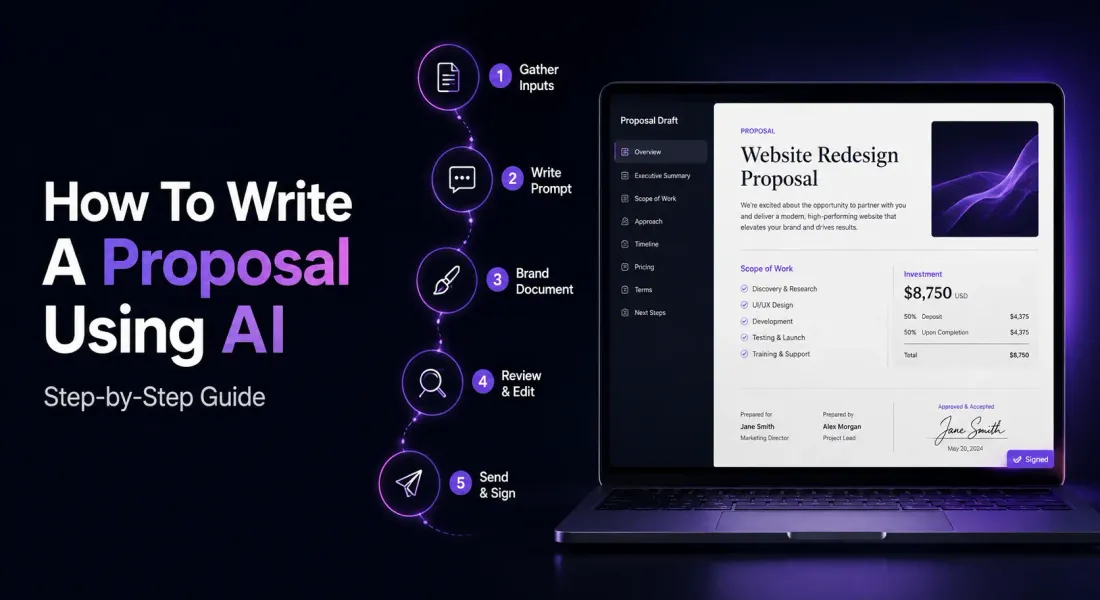
The process runs in a fixed order: gather your inputs, write a specific prompt, turn the draft into a branded document, edit for accuracy and voice, then send, track, and get it signed. Skipping a step out of order is usually where the process starts to feel slower than it should.
Step 1: Gather the Inputs Before You Prompt
A strong AI draft depends entirely on what you feed it. Before you open a prompt window, have the client’s name and context, the scope of work, your pricing, and a sense of your own brand voice ready, so the AI has something specific to work from rather than generic instructions.
The single biggest reason AI proposal drafts sound generic is a generic prompt. Spend two minutes assembling the client’s name, the problem they described to you, the specific scope you are proposing, your pricing structure, and any timeline constraints. If you have a past proposal that landed well, keep it open as a tone reference. None of this needs to be polished, a few bullet points is enough, but the AI cannot invent specificity you did not give it.
Step 2: Write a Prompt That Actually Produces a Usable Draft
A usable prompt names the document type, the client and their situation, the scope and pricing, the tone you want, and the sections you need. A vague prompt like write me a proposal returns a generic draft you will spend longer fixing than writing from scratch.
A prompt structure that consistently works looks something like this: state the document type and audience, describe the client’s situation in a sentence or two, list the scope and deliverables, give the pricing structure, specify the tone, and name the sections you want included. The more specific the input, the less editing the output needs.
If you want ready made prompt structures rather than building your own from scratch, AI prompts for business proposal creation walks through templates you can adapt directly.
There are also model specific breakdowns if you have a preference. ChatGPT prompts for proposal writing covers one approach.
And Claude prompts for proposal writing covers another, since the two models respond a little differently to the same brief.
| Prompt element | What to include |
|---|---|
| Document type and audience | State it plainly: a proposal, an SOW, a quote, and who at the client will read it. |
| Client situation | One or two sentences on the problem they described, in their own words where possible. |
| Scope and deliverables | A specific list, not a general description of what you do. |
| Pricing structure | Flat fee, hourly, tiered, or retainer, stated exactly as you intend to charge it. |
| Tone | Formal, conversational, technical, whichever matches how you actually talk to this client. |
| Sections required | Name them: executive summary, scope, timeline, pricing, next steps, and so on. |
Step 3: Turn the Draft Into a Branded Document
A general AI model hands you plain text with no logo, no colours, and no formatted pricing table. Turning that into something a client would recognise as coming from you means applying your brand manually, or generating the document inside a tool that already knows your brand.
This is the step where most of the manual time actually goes. Pasting text into a design tool, adding your logo, matching your fonts, and building a pricing table by hand can easily take longer than the AI took to write the draft in the first place. A drag and drop document editor with smart blocks for pricing and structure removes most of that manual work.
Pairing that editor with a reusable content library means your brand assets and past sections are already stored and ready to drop in rather than rebuilt each time.
Step 4: Edit for Voice, Accuracy and Client Specifics
Before anything gets sent, check three things: every fact and figure is accurate, the language sounds like your business rather than a generic AI draft, and the document is addressed to this specific client rather than a template with the names swapped.
- Fact check every number. AI can generate a confident, entirely wrong statistic or claim, known as hallucination, and a misplaced figure in a client facing document damages trust fast.
- Cut generic phrases. Lines like “we are committed to excellence” or “our cutting edge solutions” persuade nobody and are an easy tell that a document was not reviewed closely.
- Confirm the pricing matches what you actually quoted the client, not a placeholder the AI generated.
- Read it once as the client would, checking whether it answers their specific situation rather than reading as boilerplate.
Step 5: Send, Track and Get It Signed
A finished draft is not a sent proposal. Exporting to PDF and attaching it to an email leaves you with no visibility into whether the client opened it. Sharing a trackable link instead, with signing built into that same link, closes the gap between a good draft and a closed deal.
This is the stage general AI tools stop supporting entirely, and it is also where deals quietly stall. A shareable link replaces the export, attach, and email routine, and built in e-signatures let the client sign inside the same link they already opened. Signing records the signed status and the signing date, and sends a confirmation email to both sides, so neither of you is left wondering whether the document actually went through.
For a fuller look at why the writing step is only one part of a longer chain, this breakdown of what a dedicated proposal tool handles that a chat window does not is worth reading before you finalise your workflow.
Common Mistakes When Using AI to Write Proposals
The recurring mistakes are treating the first draft as final, leaving generic AI phrasing unedited, skipping a fact check on generated figures, and stopping at the writing step without a plan for sending, tracking, or signing.
| Mistake | Fix |
|---|---|
| Sending the first AI draft without a read through | Read it once as the client would before it goes anywhere near their inbox. |
| Trusting a generated statistic or claim without checking it | Verify every number against a real source, since AI can state a wrong figure with total confidence. |
| Losing brand consistency under time pressure | Use a stored content library or template rather than rebuilding branding by hand each time. |
| Treating writing as the finish line | Plan the send, track, and sign steps before you start drafting, not after. |
Final Word
AI genuinely shortens the writing step, and that is worth taking seriously. The teams that get the most out of it are the ones who treat the draft as a starting point, not a finished document, and who have a clear plan for what happens between a good first draft and a signed agreement. Follow the five steps above in order and the gap between drafting and closing gets a lot shorter.
Frequently Asked Questions
Can AI write a whole proposal on its own?
It can produce a complete first draft, but a document ready to send to a client still needs a fact check, a brand pass, and a personalisation check for that specific client’s situation.
Which AI model is best for writing proposals?
General purpose models like ChatGPT, Claude, and Gemini all produce a usable first draft from a specific prompt. The differences show up more in tone and structure than in raw capability, so the better question is usually which prompt structure you are using rather than which model.
How do I stop my AI drafts sounding generic?
Feed the prompt specific details about the client and the scope rather than a generic instruction, and edit out stock phrases like “cutting edge solutions” before sending. Specificity in, specificity out.
Is it safe to trust statistics an AI includes in a proposal?
Not without checking. AI models can generate confident, incorrect figures, a known limitation called hallucination. Verify any number or claim against a real source before it goes to a client.
What happens after the AI draft is done?
The draft still needs branding, formatting, a review pass, and a plan for sending, tracking, and signing. Treating the draft as the finish line is the most common reason the overall process feels slower than expected.

Ronak Surti

 Ronak Surti