
Table of Contents
Why ChatGPT, Gemini and Claude Cannot Replace a Proposal Tool?
You are probably already using ChatGPT, Gemini or Claude to draft your proposals. Type a prompt, get a few paragraphs back, copy them somewhere, tidy them up, send them off. It feels efficient. And the drafting part genuinely is.
But here is the test that actually matters. Time yourself from the moment you open the chat window to the moment your client has a signed, paid document in hand. Now count how many separate tools you touched to get there. If the honest answer is more than one, the AI did not save you as much time as you think. It just moved the bottleneck from writing to everything after writing.
A Scenario You Already Know
It is 9pm. A client wants a revised proposal by morning. You open ChatGPT, paste in the brief, and get a clean draft back in under a minute. Genuinely good copy. Then the real work starts.
You paste it into Google Docs or Canva. You manually add your logo, because even if the AI remembers your company name, it does not have your logo file sitting ready to insert. You fix the fonts, because remembering that your brand uses a particular typeface is not the same as applying it. You format the pricing table by hand, because it came back as plain text. Forty minutes later, you export a PDF, attach it to an email, and hit send.
The next morning, the client has not replied. You do not know if they opened it, skimmed it, or missed it in a crowded inbox. When they finally do come back with “can we move the pricing section above the case studies,” you are not editing a document. You are starting the paste-and-format cycle again.
The AI wrote the words in sixty seconds. Getting those words in front of a client, tracked, signed, and paid, took the rest of your evening.
Where LLMs Work Best?
None of this is a knock on ChatGPT, Gemini or Claude as writing tools. They are excellent at generating a first draft, reworking a clumsy paragraph, or brainstorming an angle you had not considered. If the job stopped at “produce good sentences,” this article would not exist.
The job does not stop there. A proposal is not finished when the writing is good. It is finished when it is branded correctly, sent to the right person, tracked, signed, and paid. General LLMs were never built to do any of that, and pretending otherwise is what creates the 9pm scramble above.
The Seven-Step Tax Nobody Accounts For
Every time you use a general LLM to draft a proposal, you inherit a set of manual steps that the AI itself does not do. None of these show up when you are marveling at how fast the first draft came back. All of them show up later.
Its memory does not extend to your brand assets.
Some of these tools now remember facts about you across chats. What they do not carry is your actual logo file, your exact colour codes, or your font files. Memory here means text notes, not a design system. You are still opening a separate tool and applying your visual identity by hand, every single time.
It hands you text, not a document.
The output is plain, unformatted text. Someone still has to move it into a design tool, apply a layout, and make it look like it came from a real company rather than a chat window.
Editing means re-explaining, not adjusting.
Ask for one section to change and you are either re-prompting the whole document and hunting for what shifted, or manually scrolling through the pasted version yourself. A one-line client request turns into a full re-edit.
There is no send mechanism.
The finished document still has to be exported, attached, and emailed, the exact same workflow document sending has used for a decade.
There is no tracking once it leaves your outbox.
You have no idea if the client opened it, read past page one, or ignored it entirely. Your only signal is whether they reply.
There is no signing step.
Getting a signature means opening a separate tool, generating another link, and asking your client to complete yet another action before the deal actually closes.
There is no payment at the point of agreement.
The invoice is a separate task, sent days after the client has already said yes, giving momentum every chance to cool off before money changes hands.
Individually, each step takes a few minutes. Stacked together, across every proposal you send, they are the real reason “I used AI for this” and “this took me twenty minutes” are rarely the same sentence.
The Workflow, Laid Out Honestly
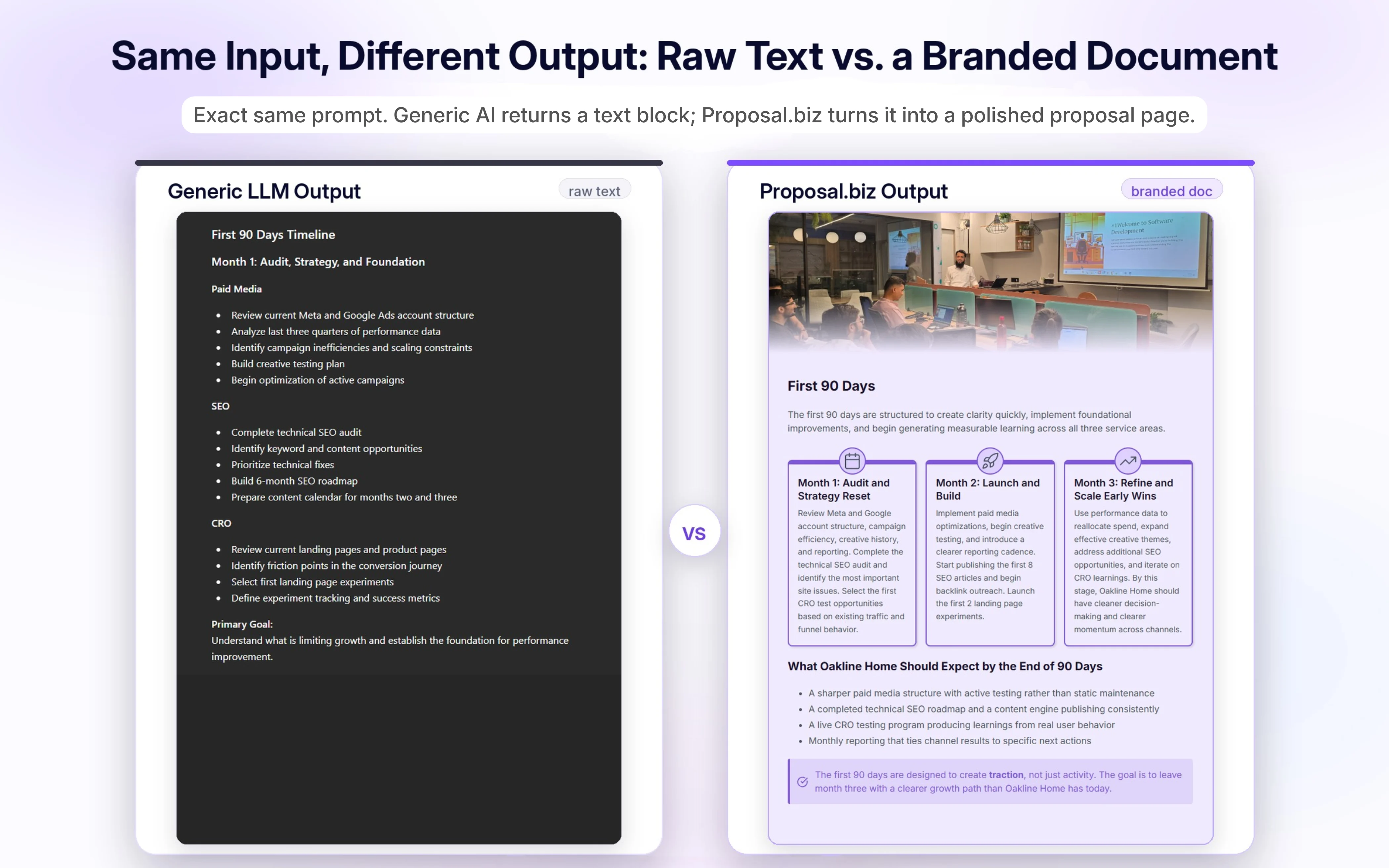
Using a general LLM on its own
Prompt the AI. Copy the output. Paste it into a design or doc tool. Manually add branding, formatting, and pricing tables. Export a file. Attach it to an email and send. Wait, with zero visibility into what happens next. If a signature is needed, open a separate tool and send another link. If payment is needed, send a separate invoice.
That is six to eight disconnected actions, spread across three or four different tools, each one a place where consistency slips or a step gets forgotten.
Using Proposal.biz
Paste your prompt, or paste your website URL the first time you set up. The document comes back already branded and structured, because the platform reads your brand once and reuses it automatically. Share it as a single link. Your client reads, comments if needed, signs, and pays inside that same link. You see exactly what they did and when.
One flow, one place, no handoffs between tools that were never designed to talk to each other.
The Part That Actually Makes This Different
Most tools that call themselves “AI document generation” still hand you a block of text and leave the rest to you. Proposal.biz generates the whole document. Structure, sections, pricing tables, layout, and branding arrive together from a single prompt, not as raw copy waiting for someone to build a document around it.
That is only possible because it starts from your brand. Paste your URL once and the platform reads your logo, colours, fonts, tone, services, pricing, case studies, and team bios, then stores it for reuse. From there, every document you generate pulls from that same brand context automatically, so the AI is not just writing sentences, it is producing a finished, styled document ready to send.
- Document Chat lets you edit inside the actual document. Ask it to trim a section or adjust the tone, and the change happens where the document already lives, not in a separate chat you then have to re-paste.
- A single trackable link replaces the export-attach-email routine entirely. It opens on any device with no download required.
- Document analytics show you which section your client actually read, and which one they skipped in ten seconds. That is information you simply do not get from an email that says nothing back.
- E-signing happens inside the same link your client already opened. Signing records the signed status and the signing date, and sends a confirmation email to both sides, no separate tool, no separate step.
- Payment collection sits at the point of signing, so the moment your client says yes is the same moment they can pay.
Same starting point as a ChatGPT prompt. A completely different finish line.
Ask for a proposal, a statement of work, or a one-pager, and what comes back is not a draft you then have to build a document around. It already looks like something your company sent.
Conclusion
This was never a fair fight over which tool writes a better opening paragraph. It is about how much distance sits between “the AI generated this” and “the client signed this.”
Every manual step in that distance is time you are not spending sourcing the next deal. It is also a quiet failure point, a follow-up that never got sent, a document nobody tracked, a signature chased down over three separate emails instead of one click. Time from draft to sent, time from sent to signed, and visibility into what happens in between, that is what actually moves a pipeline forward. A cleaner first sentence does not.
Try Proposal.biz free for 14 days and see the difference
FAQs
If ChatGPT can already write the document, why do I need anything else?
Because writing is one step in a chain of six or seven. The document still needs branding, formatting, sending, tracking, signing, and payment collection, none of which a chat window does for you.
Doesn’t copying AI output into a design tool get the job done anyway?
It gets the job done eventually, at the cost of the manual formatting time this article walks through. The document still ends up looking client-ready, the question is how much of your evening it took to get there.
Does using AI to draft a document make it feel less personal to the client?
Not if the structure and brand are handled properly. What makes a document feel generic is inconsistent formatting and a missing brand identity, not the fact that AI helped write the first draft.
Is a dedicated document platform overkill if I only send a handful of proposals a month?
The manual steps do not scale down with volume, each one still has to happen even for a single document.The time saved per document stays roughly the same whether you send two a month or twenty.
What is actually lost by treating “send the proposal” as one step instead of six?
Consistency and visibility. Six separate steps means six places where something can slip, a wrong font, a missed follow-up, a document nobody knows was even opened. One continuous flow removes those gaps rather than just making each step faster.
Isn’t this just an AI wrapper on top of a template tool?
The distinction is what the AI has access to before it writes. A template tool with AI assistance still needs you to select and adjust a template manually. A platform that reads your brand from your website once and reuses, it automatically removes that manual step entirely.

Ronak Surti
 Dimple Maru
 Prabir Chaudhary
 Ronak Surti
 ![Curated List of Best Proposal Software Tools in 2025 [Strength and Weaknesses]](/_astro/proposal_softwaretools.DWLFJBFS_1kwJoK.webp)