proposal software comparison
Proposable vs PandaDoc
This Proposable vs PandaDoc comparison puts both established proposal tools against an AI-first challenger on document creation, branding, analytics, e-signatures, payments and real published pricing. No demo required.
The Short Answer
The Proposable vs PandaDoc decision comes down to scope, and the third option changes the question entirely. Proposable is the simpler and cheaper of the two incumbents at $39 per user per month for unlimited proposals, but it has no AI, no automatic branding, and its public product pages have not been updated since 2021. PandaDoc is the more capable platform, covering contracts, forms and quoting alongside proposals with the widest integration catalogue, but the features most teams need sit on its $49 per user per month Business tier. Proposal.biz solves a different problem to both: it reads your website URL, extracts your brand, and generates the finished document for you, then tracks, signs and collects payment in the same link.
Pick Proposable for simple, cheap proposals. Pick PandaDoc for breadth and enterprise workflows. Pick Proposal.biz if writing and formatting the document is what actually slows you down.
Quick Verdict
Which One Is For You
Proposable vs PandaDoc is rarely the whole question, because the two solve different jobs and a third tool solves a third. Start here before reading a single feature row.
Choose Proposable if
You want simple proposals, nothing more
A small sales team sending proposals, estimates and quotes. You want tracking, signing and payments without a platform to learn, and AI is not on your requirement list.
Choose Pandadoc if
Document breadth and approval routing matter more than price
You send contracts and forms alongside proposals, need approval workflows, and per-seat cost is not the deciding factor.
Three Numbers Worth Knowing
$117
Proposable Team, 3 users per month
$147
PandaDoc Business, 3 users per month
$39
Proposal.biz Professional, 3 users included
How Each One Builds the Document
Every other difference in Proposable vs PandaDoc follows from this one. Two of them hand you a template. One hands you a finished draft.
Proposable
Template editor, no AI
1 Pick a template from the library
2 Fill in each section by hand
3 Style logo, colours and fonts manually
4 Fight the editor formatting
5 Send, track, sign, collect payment
Editor friction is its most common review complaint
PandaDoc
Template editor, AI assists text
1 Pick a template or start from a block
2 Use AI to help draft or rewrite copy
3 Configure branding on the Business tier
4 Route through approvals if required
5 Send, track, sign, collect payment
The strongest editor of the three, but you still write it
Proposal.biz
AI-first, URL to finished document
1 Paste your website URL
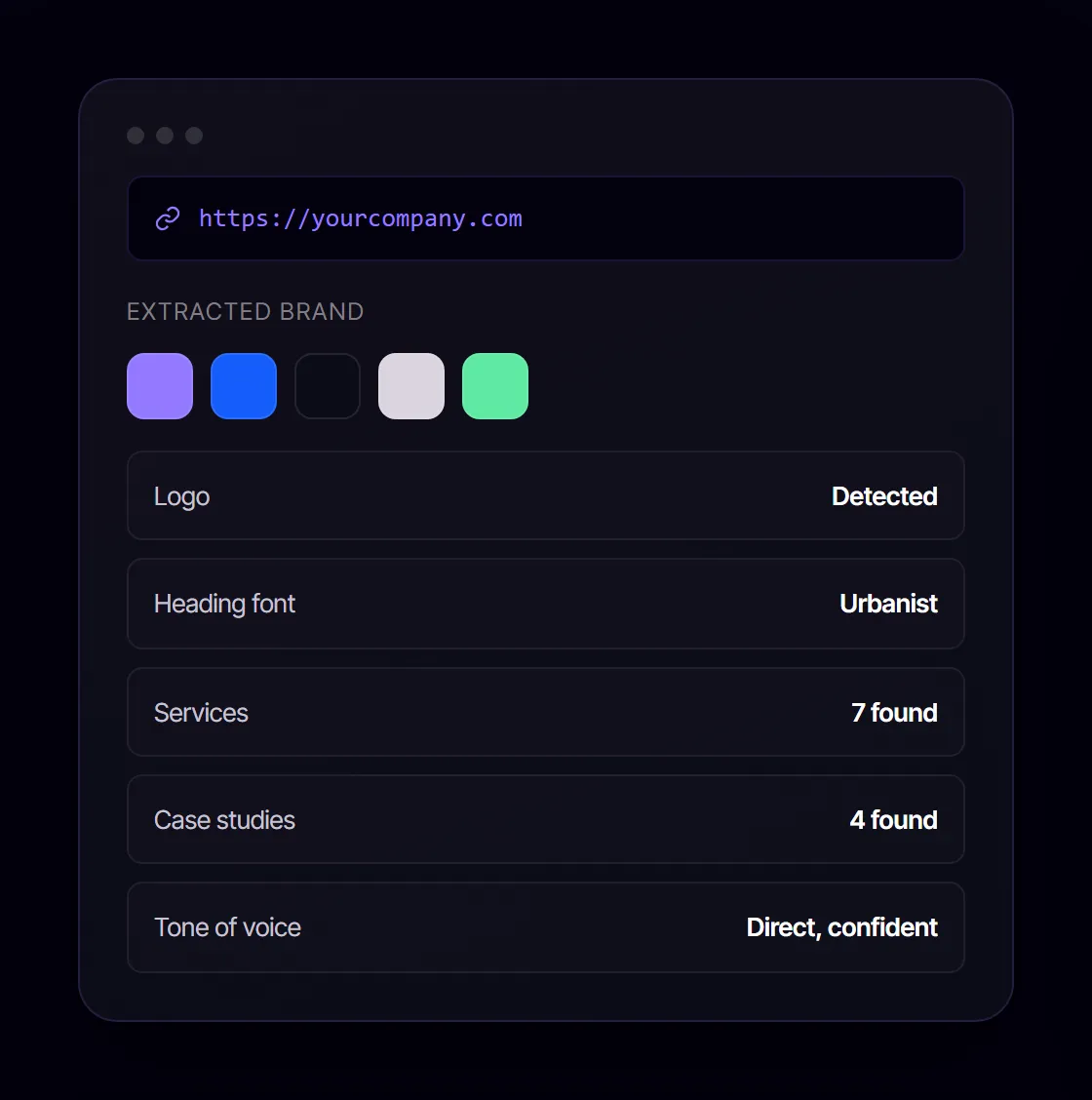
2 AI extracts brand, services, pricing, tone
3 One prompt generates the full document
4 Refine by chatting, not formatting
5 Send, track, sign, collect payment
First branded draft in about 60 seconds
Proposable vs PandaDoc vs Proposal.biz at a Glance
Positioning summary. Verified against each vendor's public product and pricing pages on 29 July 2026.
| Feature | Proposal.biz | Proposable | PandaDoc |
|---|---|---|---|
| Built for | Proposals, estimates, quotes and bids | Proposals, estimates, quotes and bids | Proposals, contracts, quotes, forms and enterprise document automation |
| Starting point | A template you fill in | A template from the library, filled in by hand | A template or content block, with AI assisting the text |
| Entry price | $19 per month, 1 user, 5 proposals per month | $19 per month, capped at 5 proposals | Free plan capped at 60 documents per year, then $19 per user per month |
| The tier most teams need | $39 per user per month | $39 per user per month (Team) | $49 per user per month (Business) |
| Best suited to | Small teams with a narrow proposal workflow | Small teams sending simple, unlimited proposals | Mid-market and enterprise teams with mixed document and compliance needs |
| Main limitation | No AI, ageing product, proposal-led range | No AI, no automatic branding, product pages unchanged since 2021 | AI writing sits on Enterprise; custom branding and CRM sync sit on the Business tier |
Full Feature Comparison
Most PandaDoc vs Proposable comparisons stop at a grid of ticks and skip the tier each feature actually sits on. This one names it. Availability is shown for each vendor's most commonly purchased paid tier, and where a feature is restricted to a higher plan, that plan is stated.
| Feature | Proposal.biz | Proposable | PandaDoc |
|---|---|---|---|
| AI document generation from a prompt | Yes. Complete branded document from one prompt | No AI writing or document generation | Assists with drafting and editing text, not full-document generation |
| Generate a document from a website URL | Yes | No | No |
| Automatic brand extraction | Yes. Logo, colours, fonts and tone from your URL | No. Branding set up by hand in the template | No. Manual branding setup, on the Business tier |
| In-document AI you can chat with | Yes. Document Chat rewrites, shortens and retones | No | No dedicated chat, but AI can rewrite or edit selected text |
| Editor | Drag-and-drop blocks plus AI editing by prompt | Template editor; formatting friction is its most common review complaint | Template or block editor with AI-assisted text, the strongest of the two incumbents |
| Content library | Yes. Built automatically from your website | No dedicated content library | Yes, on the Business tier |
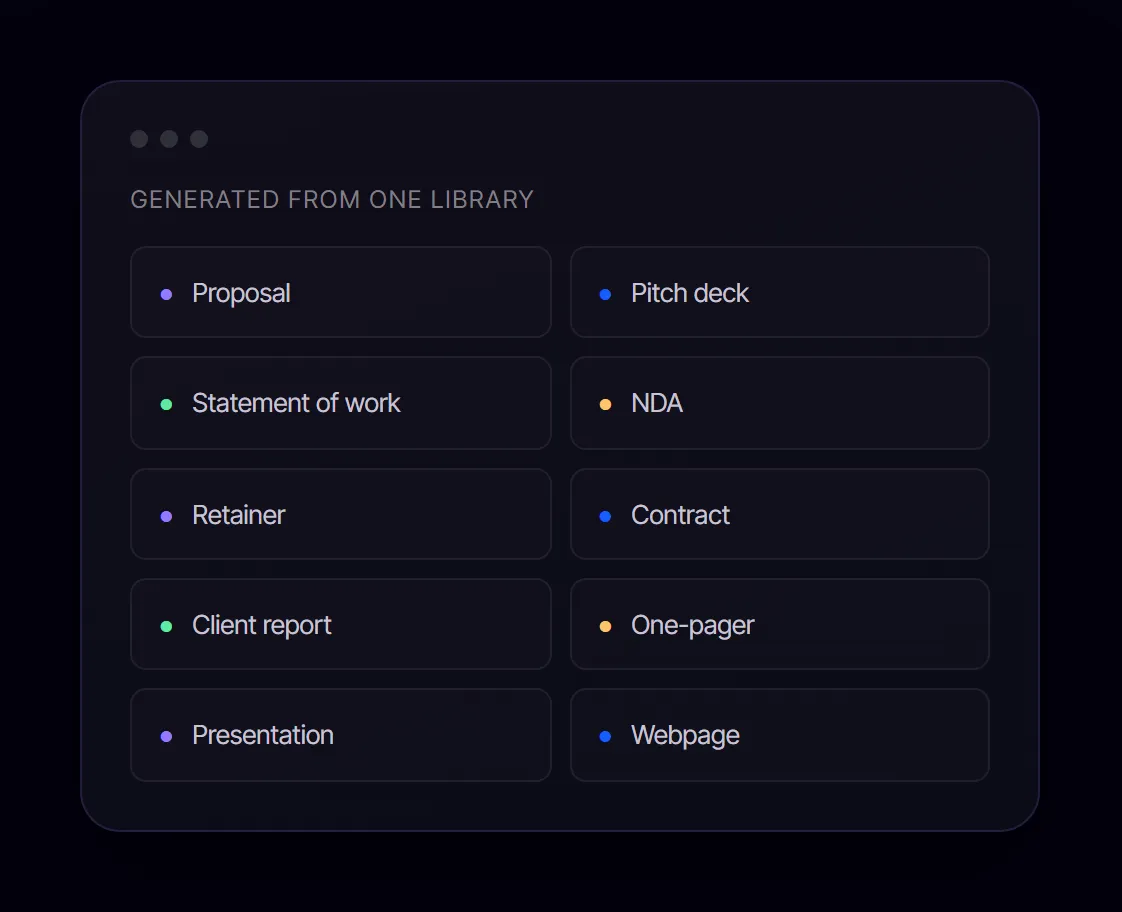
| Document types supported | Proposals, decks, SOWs, NDAs, retainers, contracts, reports, one-pagers, webpages | Proposals, estimates, quotes, bids | Proposals, contracts, forms and agreements |
| Engagement tracking | Opens, scroll depth and time spent per section | Views and time spent | Real-time tracking and notifications, deeper detail on higher tiers |
| E-signatures | Yes, every plan. Signed status, signing date, confirmation email | Yes, on every paid plan | Yes, on every paid plan, the deepest compliance coverage of the three |
| Payment collection in the document | Yes, inside the shared link | Yes, from the Team plan | Yes, on paid tiers |
| Sharing | Trackable web link, opens on any device | Trackable web link | Trackable web link, custom domains on higher tiers |
| Live collaboration | Multi-user live editing and inline comments | Not a focus area, single-editor workflow | Team-based editing on paid tiers |
| Approval routing | Not offered | Available, though only on the Enterprise tier | Approval workflows and bulk send, standard on mid tiers |
| CRM sync | CRM sync, payment integration, cloud storage, automation | Standard CRM integrations on the Team tier | Extensive CRM integrations across tiers, deeper quoting workflows |
| Document management | Folders by client or project | Basic, no folders | Folder-based organisation on paid tiers |
| API access | Available, plus an MCP server for AI agents | Available on the Enterprise tier | Available on paid tiers, part of its wider integration catalogue |
| Product actively updated | Yes, shipping regularly | Features and pricing pages unchanged since 2021 and 2022 | Actively maintained with regular product updates |
A Note on Proposable's Release Cadence
At the time of writing, proposable.com/tour carried a last-modified date of July 2021 and proposable.com/pricing carried January 2022, both running an outdated WordPress version. That does not mean the product is unsupported, but if you are signing a multi-year commitment it is worth asking the vendor directly about the roadmap before you buy.
Get started. It's Free!
Free forever - No credit card.
Book a Demo Four Differences That Actually Change Your Week
Feature lists flatten everything into ticks. These are the four points in Proposable vs PandaDoc where the difference shows up in how your team actually spends its time.
One of These Reads Your Website. Two Do Not.
01 · Branding
Proposable expects you to set up branding by hand inside its templates. PandaDoc puts custom branding on the Business tier and still expects manual configuration. Neither reads your site.
That means brand consistency depends entirely on how careful each rep is with each document, which is exactly where off-brand documents come from.
Proposal.biz takes your URL and pulls your logo, colours, fonts, services, pricing, team bios and case studies into a Smart Content Library that every document inherits automatically.
Proposals Only, or Everything You Send?
02 · Document Range
Proposable is proposal-led: proposals, estimates, quotes and bids. If that is genuinely all you send, its narrower scope is a feature rather than a flaw.
PandaDoc goes considerably wider, covering contracts, forms and agreements, and is the strongest of the three for legal and procurement-adjacent work.
Proposal.biz generates proposals, pitch decks, SOWs, NDAs, retainers, contracts, reports, one-pagers, presentations and webpages from the same content library, so the brand stays consistent across every document type.
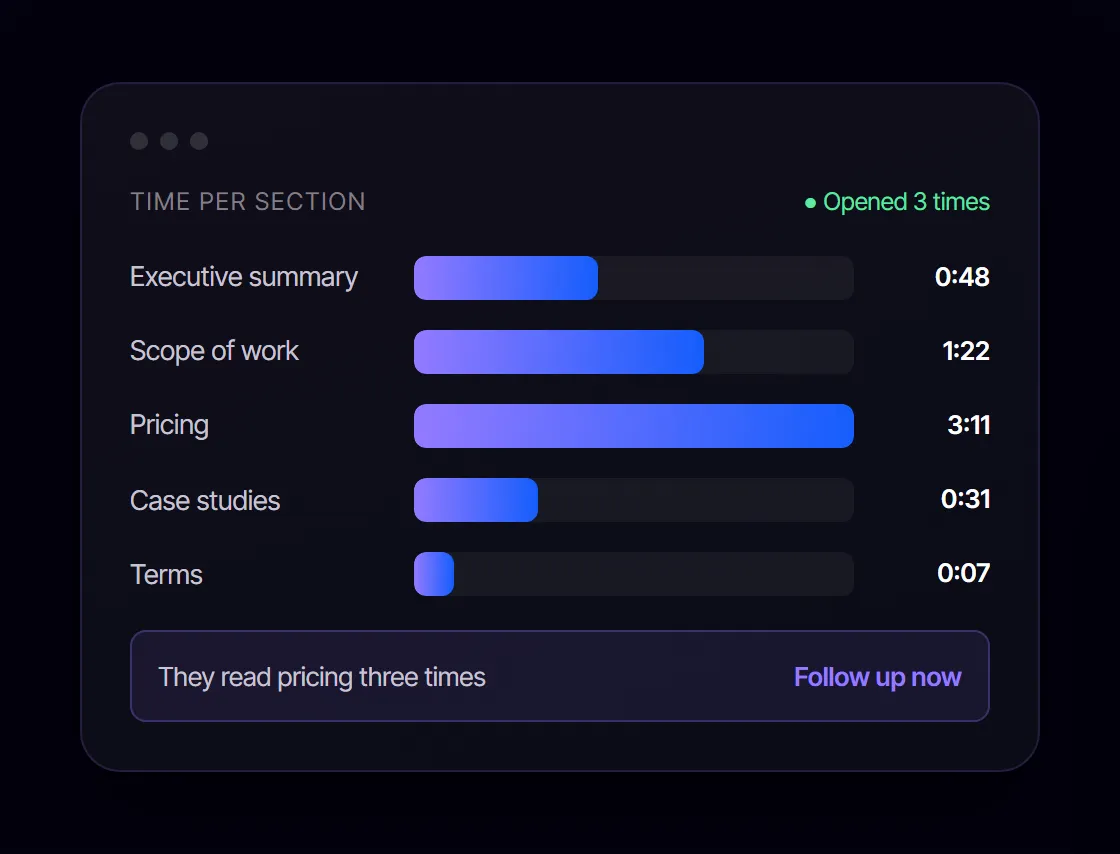
All Three Track. Only One Tells You Which Section Landed.
03 · After You Send
The send-to-signed loop is closed everywhere. All three include e-signatures and payment collection, so a client can read, approve and pay in one place.
The difference is depth. Proposable reports views and time. PandaDoc gives real-time tracking and notifications, with more detail on higher tiers, and has by far the strongest compliance credentials if you operate in a regulated industry.
Proposal.biz reports opens, scroll depth and time spent per section, so you can see which part of the document held attention and time your follow-up around it.
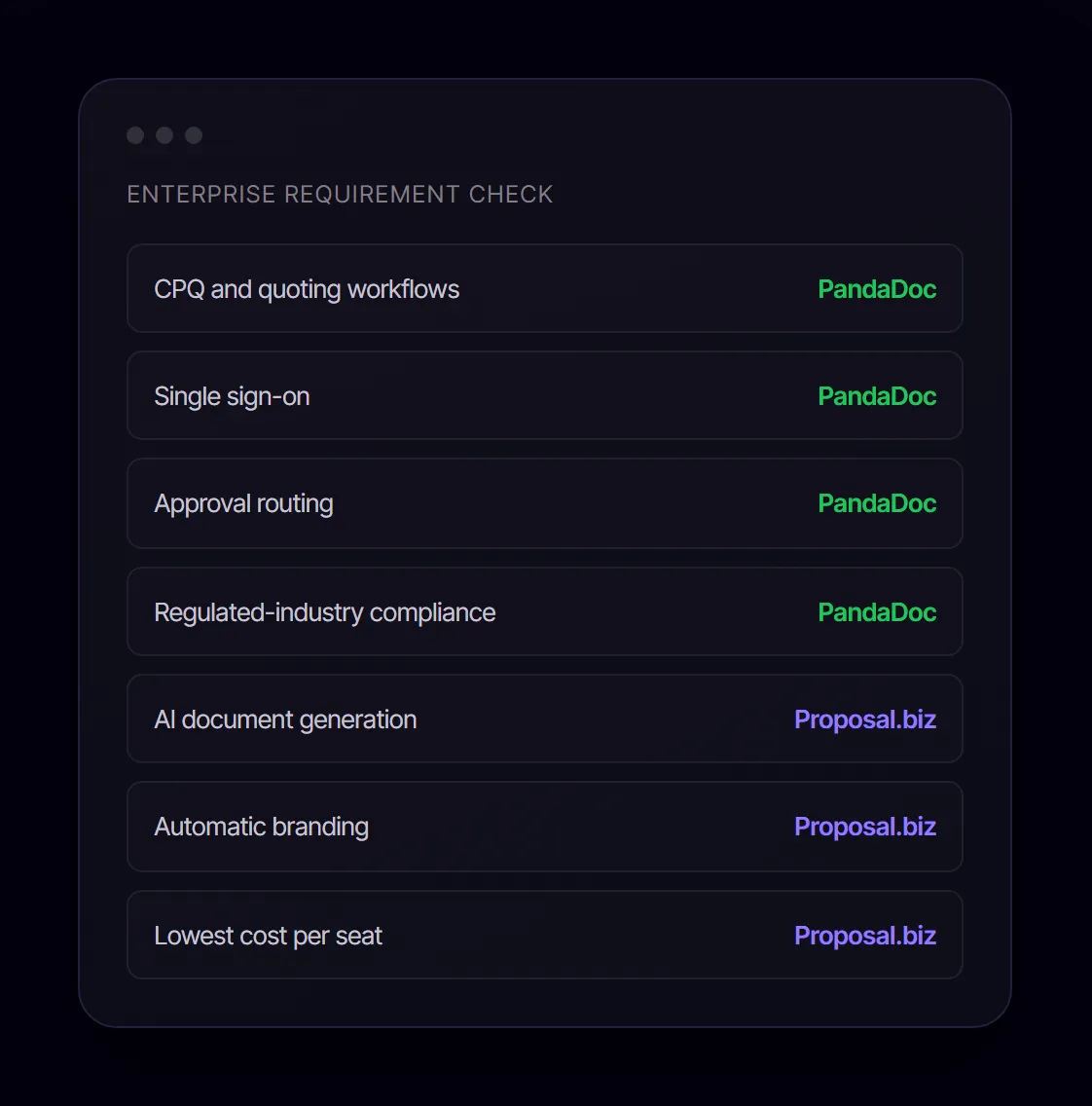
PandaDoc Wins This One Outright.
04 · Enterprise Fit
Its integration catalogue, CPQ capability, single sign-on and workflow automation put it in a different category for larger organisations. If your requirement list includes deep CRM-driven quoting or advanced compliance, PandaDoc is the answer and the other two are not serious contenders.
Be honest with yourself about whether you actually need that, because it is the reason the price is what it is. Most teams of three to ten people buy the enterprise tier and use a third of it.
Why Teams Choose Proposal.biz Over Proposable and PandaDoc
Same lifecycle as both, create, send, sign, get paid, starting from a different, faster place.
Smart Content Library: Your Brand, Pulled From Your URL
Where both incumbents rely on manual template setup, Proposal.biz reads your website and stores logo, colours, fonts, services, pricing, and tone as reusable blocks.
The Document, Written for You in Seconds
Proposable and PandaDoc both start you in a template. Proposal.biz generates the whole branded document from one prompt.
Edit by Chatting, Not Fighting an Editor
Ask Document Chat to rewrite, shorten, or retone a section, with no formatting battles on either competitor's editor.
Engagement Tracking That Times Your Follow-Up
Opens, scroll depth, and time per section, deeper than either competitor's view/time tracking.
E-Signatures and Payment, Every Plan
No tier-gating: signing and payment collection are included from day one.
Every Document Type, One Content Library
Proposals, decks, SOWs, NDAs, retainers, contracts, reports, and more, all on-brand automatically.
Pricing Compared
Proposable vs PandaDoc on cost is not a straight fight, because Proposable's seat minimums mean the sticker price and the real price often diverge. All figures reflect published list pricing as of 5 August 2026.
Pa
Proposable
Growth tier, 5-seat minimum
$55 /user/mo
- Interactive proposals and quotes
- CRM integrations from Starter
- E-signatures and payments built in
- No brand extraction
- Limited AI, full generation not available
- Five-seat minimum applies regardless of team size
Starter: $35/mo, 1 user, no CRM depth. Scale: $75/user/mo, 10-seat minimum.
Pd
PandaDoc
Business tier, per user
$49 /user/mo
- Unlimited documents
- Extensive CRM integrations
- Custom branding and content library
- Approval workflows and bulk send
- AI assists text only
- No brand extraction
Free: 60 docs/year. Starter: $19/user/mo. Enterprise: custom.
3 users included
Pb
Proposal.biz
Professional, billed annually
$39 /month total
- 3 users, 30 documents, 6,000 AI credits
- AI document generation on every plan
- Automatic brand extraction from URL
- E-signatures and payment collection
- Custom domain, branding removed
- Monthly document allowance, not unlimited
$59/mo on monthly billing. Starter: $19/mo. Business: $89/mo for 10 users.
What a Growing Team Actually Pays
Calculated from published list prices on 29 July 2026, using the tier that includes CRM sync and branding for each vendor. Proposal.biz figures are annual billing.
| Team size | Proposable | PandaDoc | Proposal.biz | You save |
|---|---|---|---|---|
| 1 user | $39/mo | $49/mo | $19/mo | 51% vs Proposable |
| 3 users | $117/mo | $147/mo | $39/mo | 67% vs Proposable |
| 10 users | $390/mo | $490/mo | $89/mo | 77% vs Proposable |
Proposable Team and PandaDoc Business both include unlimited documents. Proposal.biz plans include a monthly document allowance: 10 on Starter, 30 on Professional, 100 on Business. If your team sends more than a hundred documents a month, per-seat pricing may work out better and you should price it properly rather than take the headline saving at face value.
See full pricingWhat the Other Two Do Better
No tool wins every row of a Proposable vs PandaDoc comparison, and Proposal.biz is no exception. Here is exactly where it loses.
Proposable
- Unlimited proposals on its Team tier, with no monthly document cap
- Approval routing available, though only on the Enterprise tier
- Longer track record with established estimating and bid workflows
PandaDoc
- Far larger integration catalogue and deeper CRM-driven quoting
- Approval workflows, single sign-on and enterprise governance
- Stronger compliance coverage for regulated industries
- Unlimited documents on all paid tiers
Who Should Pick Which
The right answer to Proposable vs PandaDoc changes with team size and document mix. Here is the call for four common setups.
Freelancers and Solo Consultants
PandaDoc's free plan at 60 documents a year is hard to beat if your volume is genuinely low and you do not need branding. Proposable Solo caps you at five proposals a month for $19, which is tight. If you send varied documents and want them to look designed without hiring a designer, Proposal.biz Starter at $19 a month is the better use of the same budget.
1 Toss-up: PandaDoc Free or Proposal.biz Starter
Agencies and Small Teams of Three to Ten
This is where the pricing gap bites. Three seats cost $117 on Proposable and $147 on PandaDoc, against $39 for a three-seat Proposal.biz plan. Choose PandaDoc anyway if you need approval routing and CRM-driven quoting. Choose Proposable if you want simple and unlimited. Choose Proposal.biz if your team is rebuilding the same branded document from scratch every week.
1 Best value: Proposal.biz Professional
Mid-Market Sales Organisations
PandaDoc. The integration depth, approval workflows and governance are worth the per-seat cost once you have a sales operations function to run them. Proposable does not compete at this level, and Proposal.biz does not offer approval routing.
1 Winner: PandaDoc Business
Enterprise and Regulated Industries
PandaDoc, without much debate. CPQ, single sign-on, workflow automation and its compliance portfolio are requirements the other two do not aim to meet.
1 Winner: PandaDoc Enterprise
Frequently Asked Questions
Find answers to common questions about our product and services.
Scope. Proposable is a focused proposal, quote and estimate tool built around a template editor, e-signatures, tracking and payment collection. PandaDoc is a broader document platform that also handles contracts, forms, quoting workflows and enterprise document automation, with a far larger integration catalogue. Proposable is simpler and cheaper at the entry tier. PandaDoc is deeper and costs more once you need CRM sync and custom branding, which sit on its $49 per user per month Business tier.
At the tier most teams actually need, yes. Proposable Team is $39 per user per month with unlimited proposals, CRM integrations and payment collection included. The comparable PandaDoc tier is Business at $49 per user per month. PandaDoc is cheaper at entry level, with a free plan capped at 60 documents per year and a Starter tier at $19 per user per month, but Starter has no CRM integrations, no custom branding and no content library. Pricing checked 29 July 2026.
No. Proposable has no AI writing or AI document generation. It is template-driven, so you assemble each document yourself in its editor. As of July 2026 its public features page and pricing page had not been updated since 2021 and 2022 respectively, which is worth weighing if AI capability matters to your team.
PandaDoc offers AI assistance for drafting and editing text, and Smart Content sits on its Enterprise tier. It assists with writing rather than generating a complete branded document from a single prompt. You still choose the template, supply the substance and set up branding yourself.
PandaDoc, on depth and reliability. It provides real-time tracking and notifications on every plan, with richer reporting on higher tiers. Proposable reports views and time spent, which covers the basics but little more. Neither breaks engagement down by section, so you can see that a document was opened without knowing which part held attention. Proposal.biz reports opens, scroll depth and time spent per section, which is the level of detail that tells you when to follow up and what to lead with.
For an agency sending mostly proposals and estimates that wants low complexity, Proposable Team at $39 per user per month covers the job. For an agency that also sends contracts, NDAs and forms, or that needs CRM sync and approval routing, PandaDoc Business is the better fit despite the higher price. If the bottleneck is writing and formatting the document rather than sending it, neither solves that, and an AI-first tool is worth testing.
Proposal.biz covers the same lifecycle of create, send, sign and get paid, but starts from a different place. You paste your website URL and it extracts your logo, colours, fonts, services, pricing and tone into a Smart Content Library, then generates a complete branded document from one prompt. Proposable and PandaDoc both start you in a template. The trade-off is document allowances: Proposal.biz plans include a set number of documents per month, where Proposable Team and PandaDoc Business are unlimited.
Yes, but at different tiers. Proposable includes payment integration from its Team plan. PandaDoc includes payment collection on its paid tiers. Proposal.biz includes payment collection inside the shared document link. In all three cases the client can approve and pay in the same place they read the document.
Yes. All three include e-signatures on every paid plan. PandaDoc offers the deepest compliance coverage of the three. Proposal.biz records signed status and signing date and sends a confirmation email to both parties.
See the Difference in 60 Seconds
Paste your website URL. Watch Proposal.biz read your brand and draft a complete, branded document before you have finished setting up a template anywhere else. No card required. Every plan includes AI generation, e-signatures and payments.
Get started. It's Free!
Free forever - No credit card.
Book a Demo