
Table of Contents
Business Proposal Cover Page: How to Structure One (With Examples)
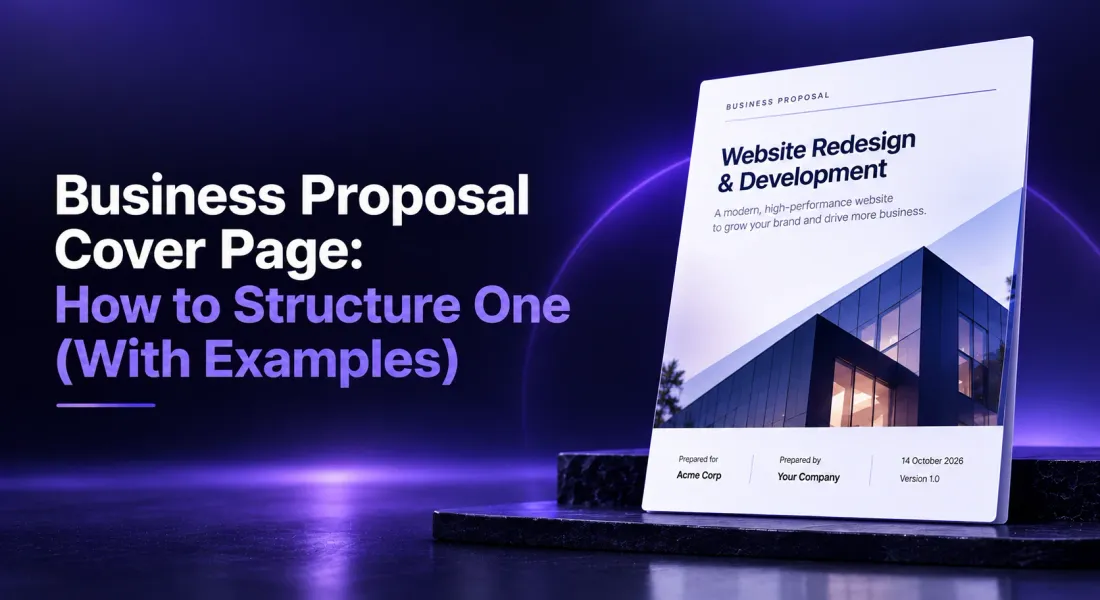
A business proposal cover page is the first page of your proposal. It names the project, the client and your company, shows the date, and sets the tone for everything that follows. A good one takes seconds to read and makes the client want to turn the page.
The cover page of business proposal documents is easy to treat as an afterthought: a logo, a title, done. But it is the page every stakeholder sees, including the ones who never read past it. It should tell them who this is for, what it is about and why it matters, at a glance.
It is also where the most embarrassing mistakes happen. Ask designers and freelancers about their worst client blunders and a misspelled client name, or a previous client’s name left on a reused template, comes up again and again. On a cover page, that mistake is impossible to miss.
This guide covers the eight elements to include, how a project proposal cover page differs, five proposal cover page examples, design tips, a pre-send checklist and the mistakes that make a proposal look rushed.
Cover Page vs Cover Letter: What Is the Difference?
The two are often confused. A cover page is a designed title page that identifies the document, the parties and the date. A cover letter is a short message introducing the proposal, written in letter form, that summarises why you are the right choice.
Most business proposals only need a cover page. Formal RFP responses often need both, and this guide on how to write an RFP response cover letter covers the letter.
Generate a branded proposal, cover page included, from your website. Create your first proposal free.
What to Include on a Business Proposal Cover Page: 8 Elements
1. A Specific Proposal Title
Name the outcome, not the document type. “Reducing customer onboarding to under a week” says more than “Business Proposal”.
Keep it under ten words where you can. A title the client can repeat to their boss in one breath is a title that travels inside their company.
2. The Client’s Name and Logo
Putting the client first shows the document was written for them. Use their logo if you have permission, or their company name in a prominent position.
Check the exact spelling and formatting of their name against their website or email signature. Small differences, such as “Ltd” versus “Limited” or a missing capital, are noticed by the people who work there.
3. Your Company Name and Logo
Your branding should be clear but secondary to the client’s. A smaller logo in a corner or at the foot of the page works well.
Keeping your branding modest on the cover also reads as confidence. The document is about the client’s outcome; your identity is clear without dominating the page.
4. The Date
The date of issue tells the reader how current the proposal is and anchors any validity period stated inside.
Use a clear format such as “14 October 2026” rather than numbers only, which can be read differently in different countries.
5. A Reference Number or Version
Useful when a proposal goes through several revisions or responds to an RFP with its own reference. “Version 2, revised scope” prevents the client from reading an outdated copy.
Version labels matter more than they seem. When several copies are circulating inside the client’s company, the version number is how everyone knows they are discussing the same document.
6. Prepared For and Prepared By
Name the main contact at the client and the person responsible on your side, with an email or phone number. It tells every reader who to talk to, including stakeholders who received the proposal second-hand.
7. A One-Line Value Statement
An optional subtitle that states what the proposal delivers, such as “A six-week plan to double qualified demo requests”. It turns the cover from a label into a reason to keep reading.
Write it last, once the proposal is finished, so it reflects exactly what the document delivers.
8. A Relevant Visual
A single image that relates to the client or project, such as their product, their industry or a mock-up of the deliverable. One strong visual beats a collage.
Avoid generic stock photos of handshakes and skylines. They signal a template, which is exactly what you do not want the first page to say.
Project Proposal Cover Page vs Business Proposal Cover Page
A project proposal cover page follows the same structure but leans on project details. The cover page for a project proposal usually adds the project name or code, the proposed start date or duration, and sometimes the project location or department.
| Business proposal cover page | Project proposal cover page | |
|---|---|---|
| Title focus | The business outcome | The project and its outcome |
| Extra details | Value statement | Project name or code, timeline, location |
| Common readers | Decision-makers and buyers | Project sponsors, managers, procurement |
| Tone | Persuasive | Clear and structured |
In both cases, keep the cover to one page and leave detail for the executive summary.
Formal Tenders: Check Whether a Cover Sheet Is Mandated
Public sector and large corporate tenders often specify exactly what the first page must contain, and some provide their own cover sheet form to complete. In those cases, a beautifully designed cover page can count against you if it replaces required information.
Read the submission instructions before you design anything. Use the exact tender title and reference number as written, include any required declarations or forms, and only then add your own branded cover if the instructions allow it.
5 Proposal Cover Page Examples
These proposal cover page examples describe layouts that work for different situations. Adapt the structure to your brand.
Minimal Corporate Cover Page
White background, client logo top left, a large proposal title in your brand font, a thin line, then “Prepared for”, “Prepared by” and the date in small type at the foot.
Best for consulting and professional services, where restraint signals confidence.
Bold Visual Cover Page for an Agency Pitch
A full-bleed image or mock-up of the proposed creative, with the title and client name overlaid in a contrasting block.
Best for marketing and creative agencies, where the cover itself demonstrates the work.
Make sure the image is genuinely yours or properly licensed, and check how it looks on a small screen, where detailed visuals can turn into clutter.
Value-Led Cover Page
The value statement is the headline (“Cut onboarding time from three weeks to five days”), with the proposal title and parties underneath.
Best for sales proposals where the outcome is the strongest argument.
Only make a claim on the cover that the proposal clearly supports. A bold headline that the content does not back up undermines everything that follows.
Project Proposal Cover Page for a Software Build
Project name and code at the top, a short descriptor (“Customer portal rebuild, 12 weeks”), client and supplier logos side by side, version number and date.
Best for technical projects with several stakeholders who need to know quickly which version they are reading.
RFP Response Cover Page
The RFP title and reference number exactly as issued, the client’s name, your company name, the submission date and a named contact.
Best for formal tenders, where matching the client’s reference format matters more than design.
For more on how layout affects the way proposals are read, see why visual proposals win more attention than plain documents.
Business Proposal Cover Page Design Tips
Use Your Brand Fonts and Colours
The cover sets expectations for the whole document. Match the fonts, colours and logo use to the rest of the proposal and your website.
This guide to business proposal design and brand covers consistency across documents.
Leave White Space
A cover that tries to say everything says nothing. Give the title room and keep supporting details small.
White space also signals confidence. Crowded covers suggest the author was not sure what mattered, so they included everything.
Design for the Screen First
Most proposals are now opened on a laptop or phone before anyone prints them, if they ever do. Check that the title and client name are readable at small sizes, and that the cover still works when shown as a small preview.
Keep It to One Page
Anything that needs more than one page belongs in the executive summary or table of contents.
Paste your URL and every proposal cover uses your logo, fonts and colours automatically. Start free.
If you find yourself wanting a second cover page, it usually means the executive summary needs to do more work.
What Comes After the Cover Page
The cover page opens the proposal; the next two pages decide whether the client keeps reading. Plan them together, and for the full structure behind the cover, read the anatomy of a winning proposal.
Table of Contents
Open Table of Contents
Executive Summary
The executive summary should deliver on the promise in the cover title. If the cover says “Reducing onboarding to under a week”, the summary explains how, what it costs and what the client gets, on one page.
Consistent Visual Language
Fonts, colours and image style from the cover should carry through every page. A designed cover followed by a plain document feels like two different companies wrote it.
Consistency is easiest when every document is generated from the same brand settings rather than copied from an old file.
Cover Page Checklist Before You Send
Run through this list every time. It takes a minute and catches the mistakes clients remember.
• Client name spelled exactly as they write it, including legal suffixes
• No leftover names, logos or details from a previous client
• Title names the outcome, not just “Proposal”
• Today’s date and the correct version number
• Correct contact names on both sides
• Client logo used with permission, or replaced with their name
• Tender reference and required forms included, if it is a formal RFP
• Title readable on a phone screen
4 Cover Page Mistakes to Avoid
A Generic Title
“Proposal” or “Business Proposal” wastes the most valuable space in the document. Name the outcome.
The title is the only part of the cover that persuades. Treat it like a headline, not a label.
The Wrong Client Name
Reusing an old proposal and forgetting to update the client name is the fastest way to lose trust. It tells the reader the document was recycled, and makes them wonder what else was copied.
No Date or Version
Without a date or version, clients can end up reviewing an outdated copy, especially after several revisions.
Add the version to the file name or link title too, so it is visible before anyone even opens the document.
Too Much Content
Bullet points, pricing or long paragraphs on the cover make it look like a slide, not a title page. Move them inside.
If something feels important enough for the cover, it probably belongs on the first page of the executive summary instead.
How to Create Proposal Cover Pages Automatically
Designing a fresh cover for every proposal takes time, and copying an old one invites exactly the mistakes above. Proposal.biz extracts your logo, fonts and colours from your website URL, so every proposal it generates starts with a branded cover page and a matching layout.
Use the drag-and-drop proposal builder to swap the cover visual, adjust the title or add a client logo.
Because the cover draws on the same brand settings as the rest of the document, a change to your logo or colours updates every new proposal without redesign work.
Then create and send proposals as a trackable link. When the client opens it, the cover page is the first thing they see on any device, and you can see when they opened it and how far they read.
Final Word on the Business Proposal Cover Page
The cover page of business proposal documents does one job: tell the reader what this is, who it is for and why it matters, before they turn the page. Name the outcome, put the client first, add the date, version and contacts, check every name twice, and keep the design clean. Then spend the effort you saved on the sections that win the deal.
For consulting firms sending detailed proposals, see how Proposal.biz supports consulting firms.
FAQs About Proposal Cover Pages
What Should Be on the Cover Page of a Business Proposal?
A specific title, the client’s name and logo, your company name and logo, the date, a reference or version number, the main contacts on both sides, and optionally a one-line value statement and a relevant visual.
Does a Business Proposal Need a Cover Page?
For anything longer than two pages, yes. A cover page identifies the document and parties, looks professional and gives every reader the key details at a glance.
What Is the Difference Between a Cover Page and a Cover Letter?
A cover page is a designed title page at the front of the proposal. A cover letter is a short letter introducing the proposal and summarising why you are the right choice.
What Should a Project Proposal Cover Page Include?
The same elements as a business proposal cover, plus the project name or code, the proposed timeline or start date, and sometimes the location or department the project covers.
Can I Use My Own Cover Page for a Government Tender?
Only if the submission instructions allow it. Many formal tenders specify the required first page or provide a cover sheet form, and missing required information can count against you.

Ronak Surti

 Ronak Surti